Live demo environment — data is fictional

Your team's AI intern for support and teamwork

SuperIntern answers your customers on the web, Telegram, Discord and more — and gives managers a live view of their whole team through Team CRM, agent-to-agent calling, and the team MCP server. This site is a working demo: the floating button in the corner is the real SDK talking to a real agent.

Tickets resolved by AI
40k+
Median response time
20s

One agent, two skills

The floating SuperIntern on this page is one agent running two different skills: customer support and sales. Pick a tab — the widget switches skills so you can try each one live.

Customer Support skill

First-line support with a human safety net

The agent resolves most questions on its own from your knowledge base. For everything else there's a real escalation path: human handoff, proper tickets, and a workstation where your team closes them out.

Opens as

Escalation to a human

The agent answers first-line questions from your knowledge base. The moment a visitor asks for a person — or the AI decides it's out of its depth — the conversation hands off to your team without leaving the chat window.

  • Visitor-triggered (“Talk to a human” button) or AI-triggered escalation, your choice.
  • Anonymous visitors are asked for their name and email before the handoff, so no ticket is ever orphaned.
  • Your team's replies stream back into the same widget conversation, live.
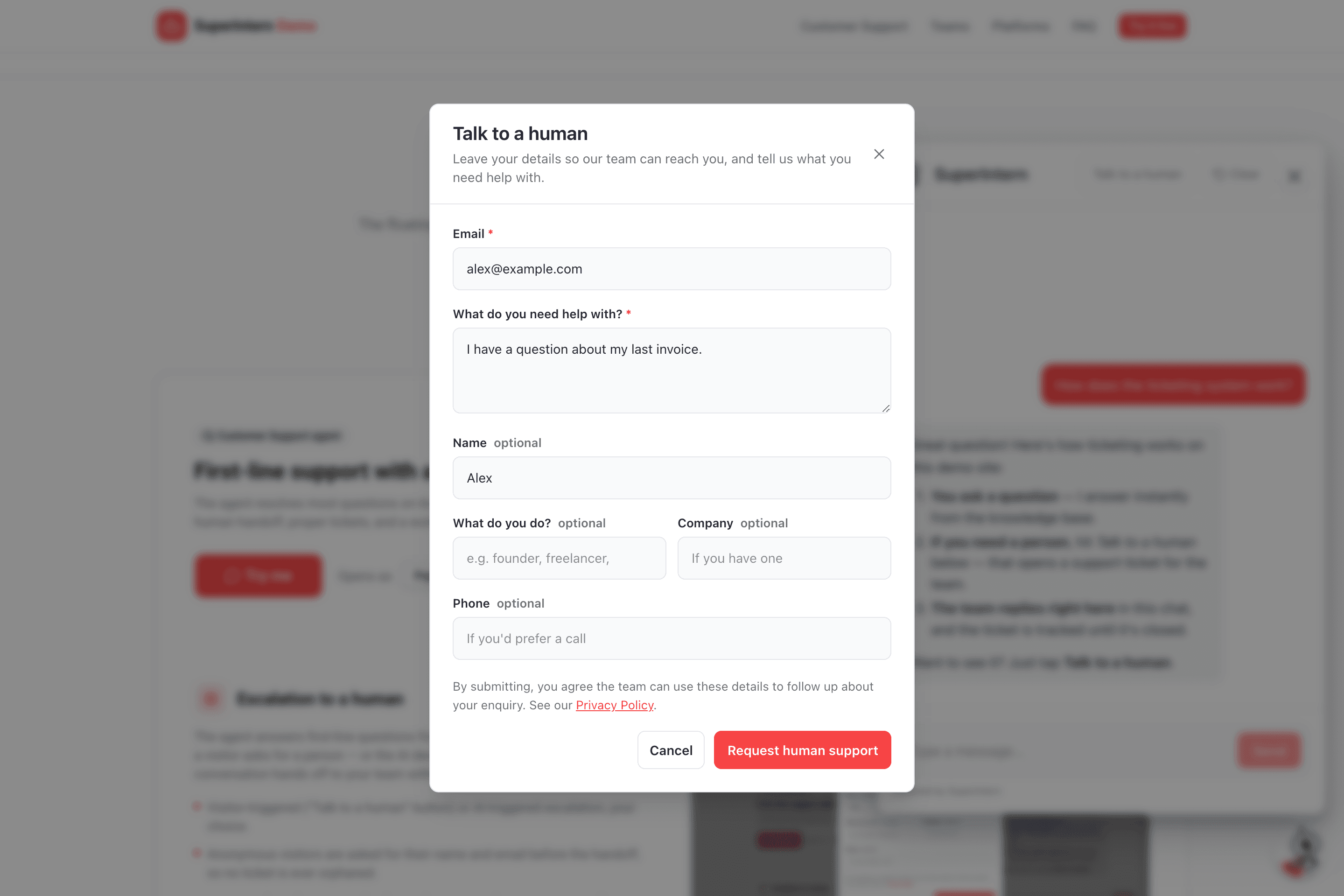
The SuperIntern widget escalating a conversation to a human support agent

Ticket management

Every escalation opens a case with a full lifecycle: opened, escalated, claimed by an admin, closed, and reopened if the visitor comes back. Nothing depends on someone remembering to follow up.

  • Full conversation log per case — visitor, AI, and admin messages — with a shareable case token.
  • Automatic reminders chase tickets that sit unclaimed or unanswered.
  • Resolved cases can be learned back into the knowledge base, so the next visitor gets an instant answer.
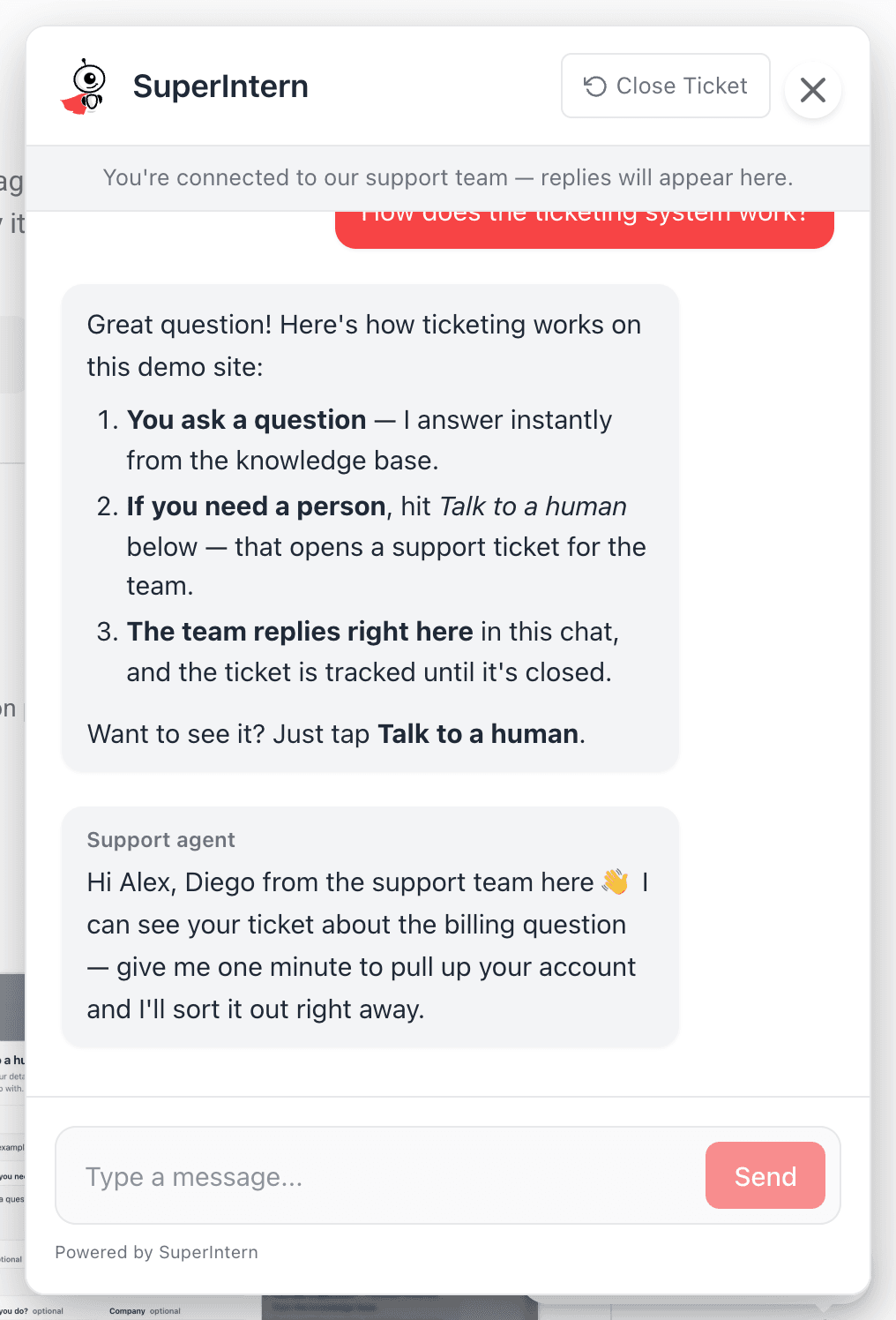
An escalated web chat ticket with its conversation log and case status

The Workstation

A purpose-built inbox where your team works the queue: escalated web chats, Telegram and Discord tickets, all in one place — with the AI still helping behind the scenes.

  • Live queue of open and escalated cases with visitor context at a glance.
  • Reply to website visitors directly from the workstation — they see it instantly in the widget.
  • A knowledge-base helper drafts suggested replies from your docs while you type.
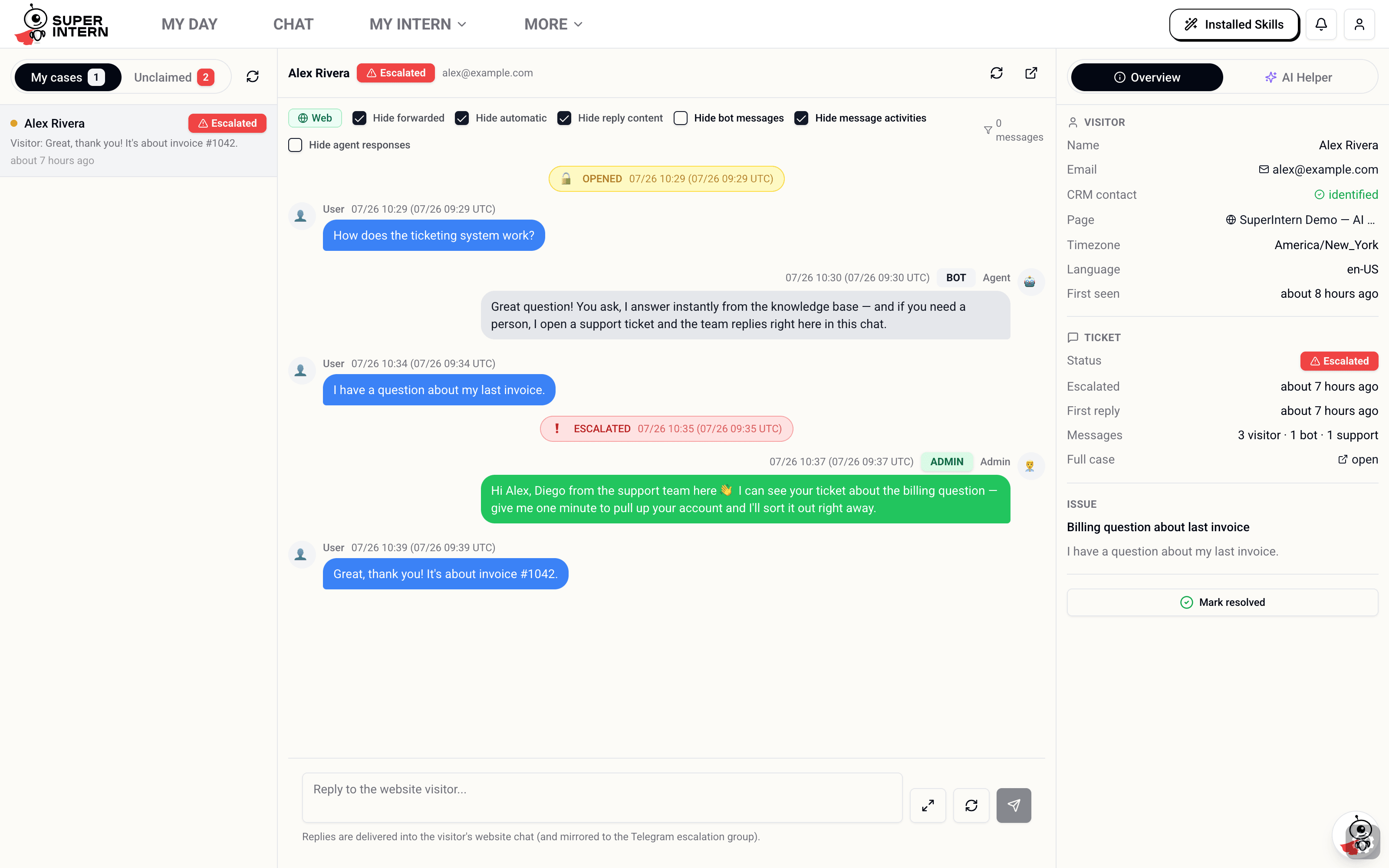
The SuperIntern workstation where admins handle escalated support cases

The widget is in support mode right now — open it, ask a question, then ask to talk to a human and watch the escalation happen for real.

Built for teams

Every member gets their own agent. The org chart decides who can see — and talk to — whose.

Team org structure
Model your real reporting lines. Managers reach their reports (and their reports' reports); the owner reaches everyone. That reach controls agent visibility, chat history access, and CRM data — everywhere.

Demo Team

👑 Demo Main — owner, reaches everyone

├ Alice (Marketing) · her own agent

├ Bob (Sales) · his own agent

├ Carol (Product) — manages Dave

│ └ Dave (Engineering)

└ Erin (Customer Success)

Team agent calling
Managers don't chase status updates — their agent asks the team's agents directly. Ask your intern “where is Bob on the Acme renewal?” and it calls Bob's agent, gathers the answer, and reports back.

You →“What's the latest with Acme Corp across the team?”

Your agent →calls Bob's and Erin's agents, merges their answers

Reply →“Bob sent the renewal proposal Tuesday; Erin has an open ticket about onboarding — awaiting reply for 2 days.”

Scoped by the org tree — leaf members can't call anyone, and nobody can call upward past their reach. Per-member CRM metrics come with it.

Team CRM
Every agent quietly builds a CRM from real emails, meetings, and chats. Team CRM merges them: one view of every contact and company the team touches, with attribution for who talked to whom, when.
  • Team Contacts: merged by email across all reachable members, with “handled by” badges and full interaction timelines.
  • Team Companies: accounts merged across the team — who tracks them, how many contacts, and the last touch.
  • Per-member performance: outreach, replies, emails sent, clients touched, and who's been left waiting.
Merged by emailOrg-tree scopedDate-window filters
Team MCP server
Expose any team agent + skill as a Model Context Protocol endpoint. Claude, Cursor, or any MCP client can then call your agent as a tool — secured with a team API key, or public if you prefer.
{
  "mcpServers": {
    "acme-support": {
      "url": "https://api.superintern.ai/mcp/acme-support",
      "headers": { "Authorization": "Bearer sk_live_..." }
    }
  }
}

Named endpoints per team, backed by an agent and the skill you choose. Creation is gated by team-admin permissions.

And everything else teams need

White-label Telegram bot

Bring your own bot token and every agent in the team answers under your brand — DMs route to each member's agent automatically.

Invites & domain auto-join

Invite by email, approve join requests, or let anyone with your company domain join automatically with default permissions.

Security policies

Enforce 2FA for every member, require Google-only sign-in, and manage trusted devices — set once at the team level.

Data retention control

Team managers choose how long conversation data is kept (7–365 days); the policy applies to every member automatically.

Granular permissions

A bitmask role system — team admin, general admin, agent manager, mode/project/automation manager and viewer roles — mirrored into the org tree.

Team billing

Every agent has its own credit balance and tier, and admins see usage across the whole team from one dashboard.

Meet your users on every platform

One agent, one memory, one CRM — across every channel your customers and teammates already use.

Web (SDK)TelegramDiscordSlackWhatsAppMicrosoft TeamsiMessageLINEWeChatTwitter / XGitHubGmailOutlookGoogle CalendarGoogle DriveNotionLinkedInInstagram

Teams run on SuperIntern

Our Telegram support group went from chaos to a real ticket queue overnight. The agent answers 90% of questions before anyone on my team even sees them.

Priya Sharma

VP Operations, Acme Corp

I ask my intern what my team shipped this week and it just… asks their interns. Team agent calling replaced our Monday status meeting.

Hannah Kim

Growth Lead, Globex

Team CRM finally shows me every account we touch — who talked to them last and who's been left waiting. The companies view is my new homepage.

Marco Rossi

Creative Director, Northwind Digital

Quotes and companies are fictional — this is a demo environment.

This part is real

Try the demo agent now

The floating SuperIntern in the bottom corner is the actual SuperIntern Web SDK, connected to a live agent. It follows the tab you picked above — customer support or sales rep — so ask it anything, escalate to a human, or leave your contact details and watch it all happen in real time.

Click the floating button to start chatting

Frequently asked questions

Still curious? Ask the agent in the corner — that's what it's for.